Car Sort: Color Puzzle Level 751 Solution Walkthrough
Route Reference
Key opening, middle, and finish positions for this route.
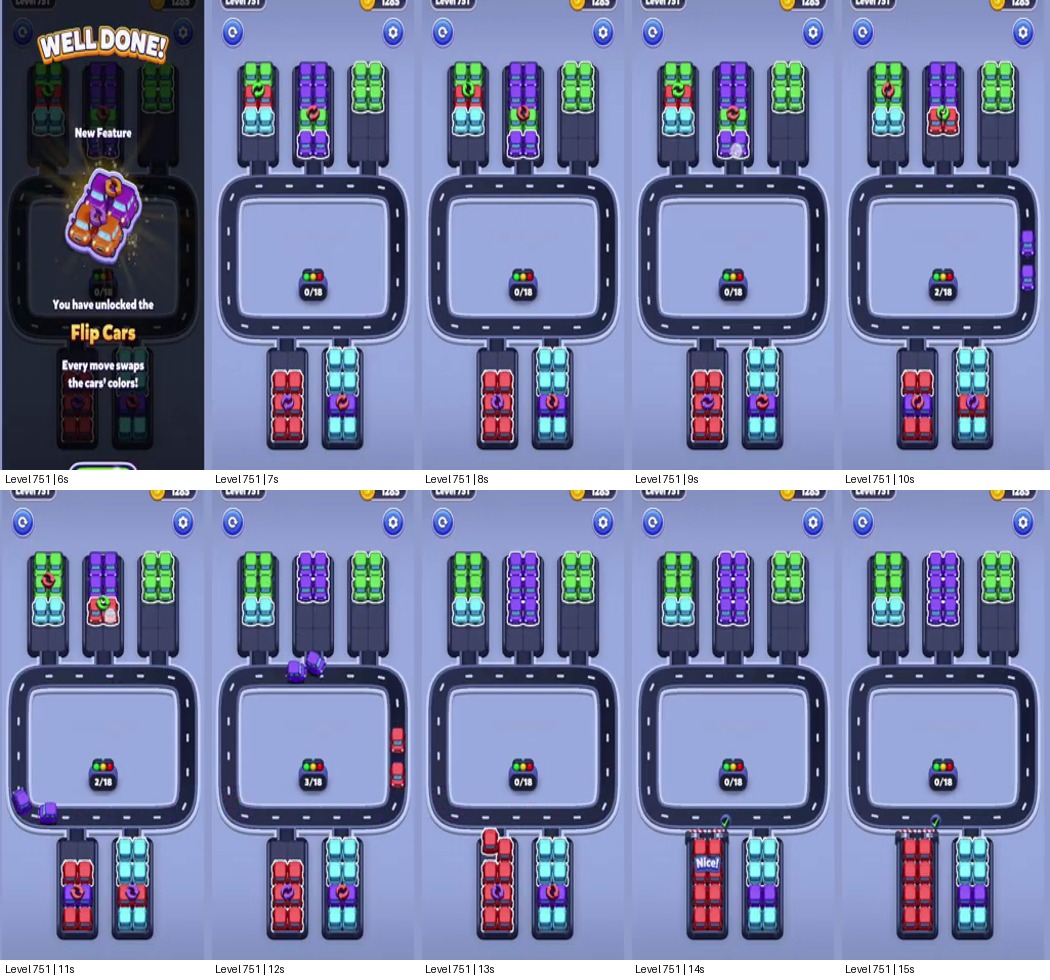
Read The Flip Rule Before Sorting
Car Sort: Color Puzzle Level 751 is short, but it introduces a rule that changes how the board should be read: the opening card says that every move swaps the cars' colors. The layout has three tall bays above a square loop road and two more columns below it. Because a tap changes the color state, the visible color at the start is only a temporary snapshot. Do not plan this walkthrough as a normal “clear every red car, then every blue car” level.
The useful route is to work the loop in single-color batches and check the affected columns after every move: purple from the upper middle -> red from the lower left -> cyan from the lower right -> green from the upper bays -> finish the newly exposed pairs. The video is only about half a minute of gameplay, so use the board state and the 18-car counter as checkpoints rather than matching its seconds exactly.
Use The Center Loop As A Buffer
At the opening, the outer columns look ready to clear, but the central loop is the only place where moving cars can pass without locking the narrow vertical bays. The upper-left stack shows green above red and cyan; the center stack is purple; the upper-right stack is green. Below the loop, red and cyan occupy separate columns, each with another color visible in the stack. That split is important: the lower columns are not interchangeable parking.
Start with the upper-middle purple group. It has a direct path into the loop and is the first batch visibly circulating in the clearer gameplay segment. Let that group complete its pass before pulling from either lower column. When the counter advances, recheck the color pairs: the Flip Cars rule can change which cars are safe to release next. If the loop still contains purple traffic, do not add red just because red is exposed at the bottom left.
Alternate The Lower Columns Carefully
After the purple pass creates room, use the lower-left red column as the next release. Keep its cars together through the loop; the lower-right cyan column is the tempting early move, but opening both sides at once fills the shared road with two batches while colors are shifting. The video shows the red group reaching its “Nice!” checkpoint before the remaining lower stack is cleared.
Move cyan only after the red cars have cleared the narrow bottom entrance. Then return to the upper stacks, where the front colors have changed as earlier moves resolve. Choose the next batch by its current color and destination, not by the color it had at the start. If the displayed color no longer matches the car you expected, pause and inspect the whole stack before tapping again; one careless move can turn a clean pair into a mixed queue.
Recover From A Bad Flip
If the loop becomes crowded, stop opening columns and let the active batch finish. The safest recovery point is a cleared loop with the progress counter updated and the two lower columns still separated. If you moved cyan too early, finish whichever color already has a clear route rather than trying to undo it by adding another batch. When the top-left stack changes after a move, treat its new front car as the real blocker and postpone the rest of that column until the loop is open.
The final cleanup is faster than the opening because the route is already established. Work the remaining front pairs one at a time, checking the flip after every release, until all 18 cars are accounted for. The completion screen follows soon after the last pair clears. This solution works because it uses the central loop as temporary breathing room while respecting the level's changing colors; keeping the lower-left and lower-right columns distinct prevents an avoidable traffic jam.